
EVO33 Login & Account Guide
How to sign in safely, recover access if you are locked out, and tell a real login page from a copy built to steal your password.
Written for players in Nepal · Last updated 21 August 2026
In short
To sign in, open the operator’s official site or app, enter the username or phone number you registered with, and enter your password. Your account lives on the operator’s servers, so the app and the browser use the same login. Before you type anything, check the web address — lookalike domains are the main way accounts are stolen.
18+ only. Gambling involves financial risk — never stake more than you can afford to lose. See our responsible gambling page. Affiliate disclosure: this is an independent information site, not the operator. We may earn a commission from links here.
What this page covers
Everything below is written for players in Nepal
How do I log in to my account?
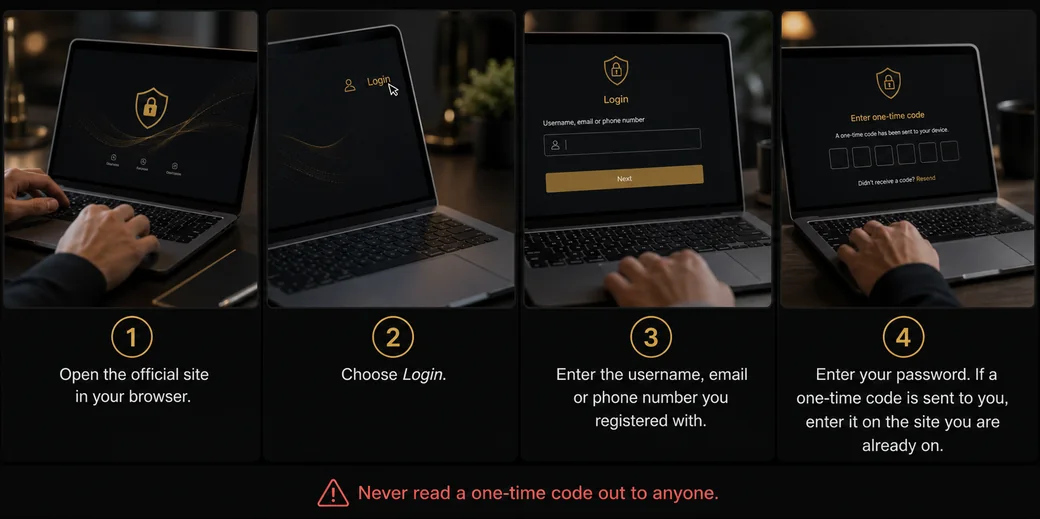
- Open the official site in your browser, or open the app if you installed it.
- Choose Login.
- Enter the username, email or phone number you registered with.
- Enter your password. If a one-time code is sent to you, enter it on the site you are already on — never read it out to anyone.
Not installed the Android app yet? Our app and APK guide covers doing that safely first.
If you registered on a phone and are now on a laptop, the same details work. The account is held by the operator, not stored inside the app, so there is nothing to transfer between devices.
How do I check the page is real before I type?
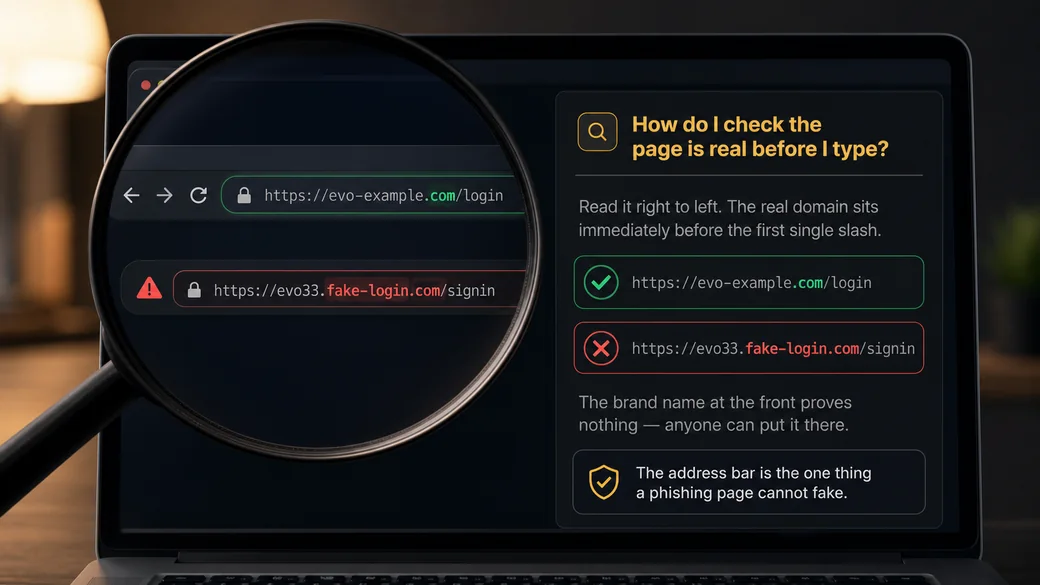
This is the part worth slowing down for. Nepali users search for several different spellings of this brand’s web address, not just the brand name — the keyword data shows people guessing at more than one domain. That uncertainty is exactly what a phishing page is built to catch.
A fake login page can be a pixel-perfect copy. What it cannot fake is the address bar. Four checks, in order:
- Read the address from right to left. The real domain is the
part immediately before the first single slash. In
evo33.example-login.com/signinthe actual domain isexample-login.com— the brand name at the front is decoration. This is the single most useful skill on this page. - Look for HTTPS and the padlock — but do not stop there. A padlock means the connection is encrypted, not that the owner is honest. Phishing sites have padlocks too.
- Arrive by typing, not by tapping. Type the address yourself or use your own bookmark. Links forwarded through Telegram, WhatsApp, YouTube descriptions or comment sections are the standard delivery route for lookalike pages.
- Never enter a password on a page you reached from a message, even if the message appears to come from support. Close it, open the site the way you normally do, and check whether the same prompt appears.
If you have already typed your password into a page you now doubt: change that password immediately on the real site, change it anywhere else you reused it, and check your payment app for transactions you did not make. Speed matters more than certainty here — change it even if you are only half sure.
Our payments guide explains what a genuine transaction check looks like, and the help guide covers reaching support without meeting an impersonator.
What if I forgot my password?
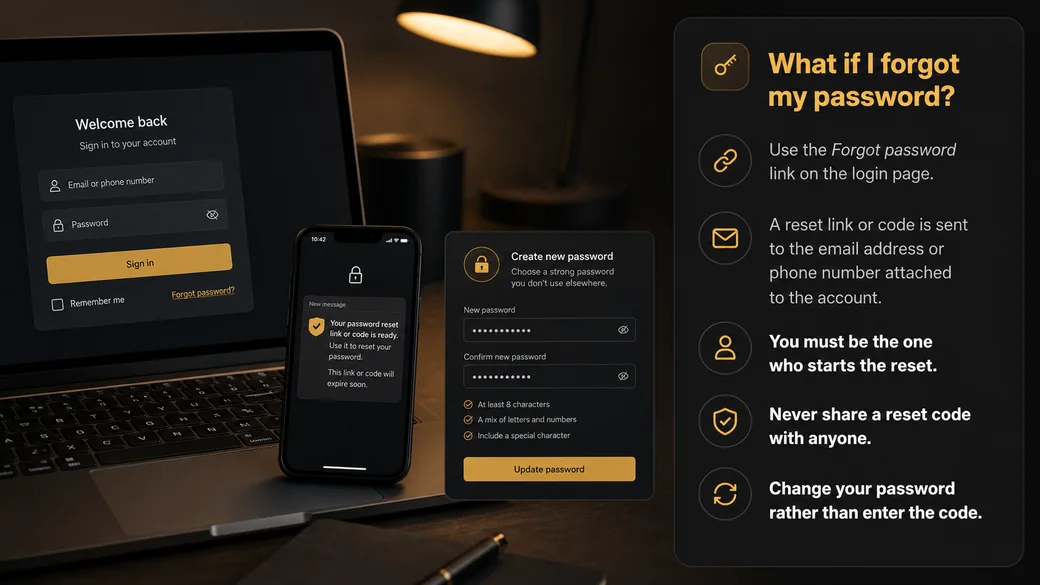
Use the Forgot password link on the login page. A reset link or code is sent to the email address or phone number attached to the account, and you set a new password from there.
Two rules make this safe. You must be the one who starts the reset — a code that arrives when you did not request one means someone else is trying to get in, and you should change your password rather than enter that code. And no genuine support process ever asks you to read a reset code back to a person. Anyone asking for it is using it, live, while you speak.
Why does it say my details are wrong?
| Cause | What to do |
|---|---|
| You are on a lookalike domain | The credentials are correct but the site is not the one holding your account. Re-check the address using the right-to-left rule above. |
| Autocorrect or caps lock | Reveal the password with the eye icon and retype it. Phone keyboards capitalise the first character by default. |
| Registered with a different identifier | Try the phone number if you are entering an email, or the reverse. |
| The account is not verified yet | Check for a verification message from registration. Until verification completes, sign-in may be limited. |
| Self-exclusion or a cooling-off period is active | These are deliberately irreversible for their duration. That is the protection working as intended — see our responsible gambling page. |
| Network or app cache | Switch between mobile data and Wi-Fi, or open the site in a browser instead of the app, to establish where the fault is. |
How do I keep the account secure?
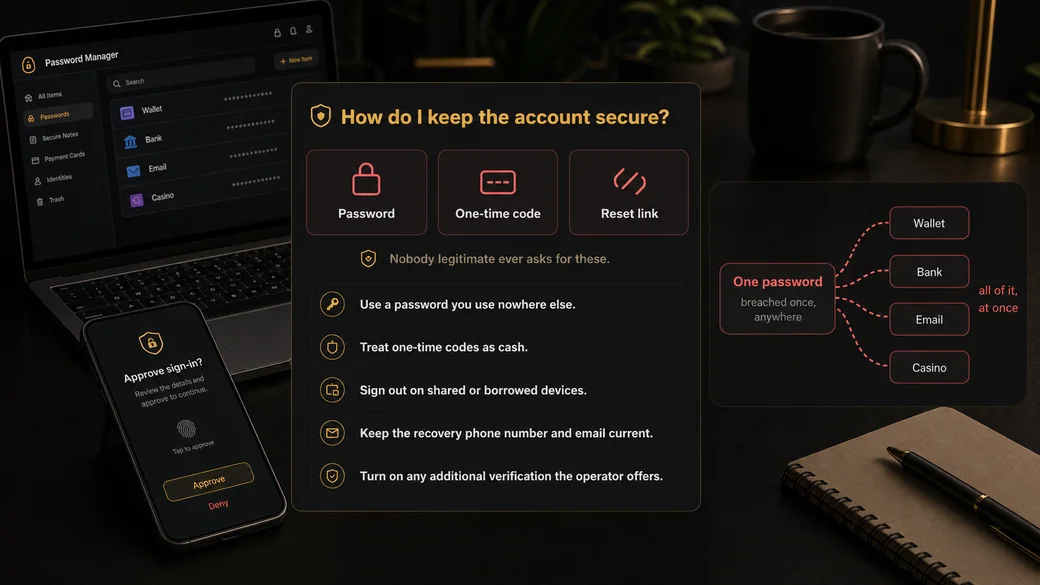
- Use a password you use nowhere else. Above all, never reuse the password from your eSewa, Khalti or bank account. If one site is breached, reuse is what turns it into a financial loss.
- Treat one-time codes as cash. No employee of any legitimate company needs your OTP. Nobody.
- Sign out on shared or borrowed devices, and avoid saving the password in a browser that other people use.
- Keep the recovery phone number and email current. If you lose access to those, you can lose access to the account.
- Turn on any additional verification the operator offers.
EVO33 login not working?
You see a “Maintenance” page. EVO33 runs scheduled maintenance, and search results have shown a “Maintenance” link for evobet33.com. Wait and try again later. Don’t use a “backup login” link someone sends you.
“Wrong details” when you’re sure they’re right. Check the phone-number format. EVO33’s login form asks for the number with the country code, e.g. 977XXXXXXXXX. Then use Forgot Password? on evobet33.com.
Wrong currency. The login form asks you to pick your registered account currency. For Nepal that is NPR.
Still stuck? EVO33 says its customer service is available 24 hours a day, 7 days a week. Use the LiveChat, WhatsApp or Telegram links on evobet33.com itself, never contact details from a social-media comment or message.
Frequently asked questions
How do I log in to my account?
Open the official site or app, select Login, and enter the username, email or phone number you registered with along with your password. The app and the browser share one account, so the same details work on any device you sign in from.
I forgot my password — what now?
Select Forgot password on the login screen. A reset link or code goes to the email or phone number on the account. Only ever start the reset yourself, and never read the code aloud to anyone who contacts you claiming to be support.
Which website address is the real one?
We deliberately do not assert one here, because naming the wrong address would put you at risk. Verify it yourself: read the domain right to left, arrive by typing rather than tapping a forwarded link, and bookmark the page once you are confident it is correct.
Why does it say my details are wrong?
Most often you are on a lookalike domain, or autocorrect has altered the password. Also check whether you registered with a phone number rather than an email, whether verification is complete, and whether a self-exclusion period is currently active on the account.
Is it safe to stay logged in on my phone?
On a phone only you use, with a screen lock enabled, it is reasonable. On a shared, borrowed or public device it is not — sign out every time. Anyone who picks up an unlocked phone with an active session has full access to the wallet.
This is an independent information site. We do not host any download, cannot access your account, and never ask for a password or a one-time code.
Sign in without being phished
A fake page can copy everything except the address bar. Check it before you type.